
DSL vs. Cable Internet: Weighing Your Options When Fiber Isn't Available
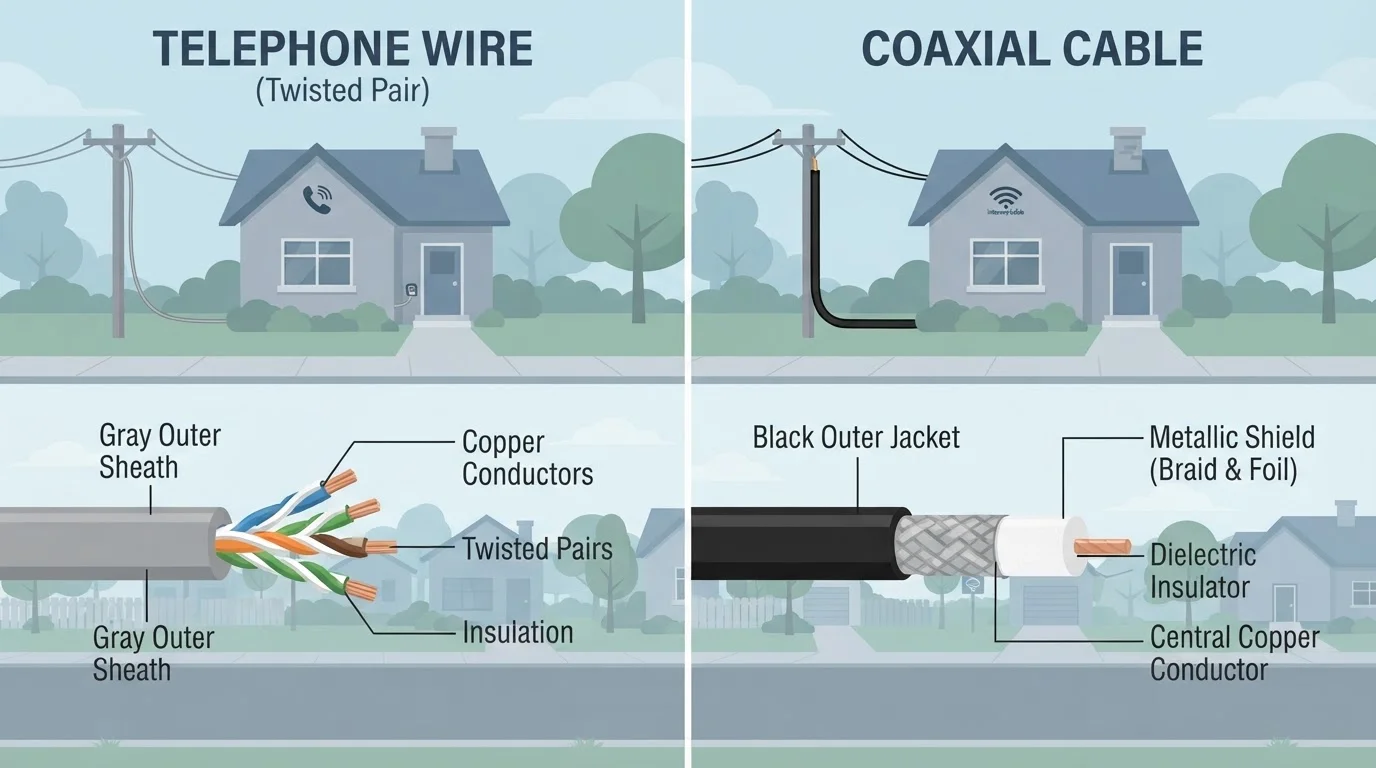
Photo credit: ResultsPoint.net | Find The Required Information
In this article
If fiber hasn't reached your area yet, DSL and cable are likely your main options. Here's how they stack up on speed, reliability, and cost.
Key Takeaways
- DSL uses existing phone lines and is widely available, but typically delivers slower speeds than cable.
- Cable internet is faster and more consistent for most households, but speeds can dip during peak evening hours.
- DSL speed degrades significantly the farther your home sits from the provider's equipment.
- Cable is a shared connection, meaning neighborhood traffic can affect your speeds during busy periods.
- Neither DSL nor cable matches fiber's performance — if fiber becomes available in your area, it's worth evaluating.
- Your best choice depends on what's actually available at your address, your household size, and how you use the internet.
What DSL and Cable Actually Are
Both DSL and cable internet deliver a broadband connection to your home — but they travel over completely different physical paths.
DSL (short for Digital Subscriber Line) runs over the copper telephone wires that already exist in most American homes. Your provider sends internet data and phone service over the same line, with equipment at either end keeping the signals separate. Because telephone infrastructure is so widespread, DSL tends to be available in places cable and fiber haven't reached.
Cable internet uses coaxial cable — the same thick cable that carries cable TV into your home. Coaxial cable has much more capacity than a standard phone line, which is a big part of why cable typically delivers faster speeds. For a deeper look at how these technologies fit into the broader landscape, see our guide to home internet connection types.
| Criterion | DSL Internet | Cable Internet |
|---|---|---|
| Infrastructure used | Copper telephone lines | Coaxial cable |
| Typical download speeds | 10–100 Mbps | 100 Mbps–1 Gbps+ |
| Typical upload speeds | 3–10 Mbps | 10–50 Mbps (varies by plan) |
| Distance sensitivity | Speed drops farther from provider equipment | Minimal distance impact |
| Network type | More dedicated per household | Shared with neighborhood |
| Rural availability | Broadly available | Mainly suburban/urban |
| Peak-hour congestion | Less affected | Can slow during busy periods |
Speed, Reliability, and the Distance Problem
Speed is where these two technologies diverge most clearly. Cable plans commonly offer download speeds ranging from around 100 Mbps on the low end to 1 Gbps or more on higher tiers. DSL plans typically top out well below that — often in the 10–100 Mbps range depending on your provider and location.
There's another wrinkle with DSL: distance decay. The farther your home sits from your phone company's local equipment (called a central office or DSLAM), the weaker and slower your connection becomes. A neighbor three blocks closer to that equipment may get noticeably better speeds on the exact same plan. Cable doesn't suffer from this distance problem in the same way.
Cable does have its own reliability quirk, though. Because it's a shared network — meaning your connection is pooled with neighbors on the same line — speeds can slow down during peak evening hours when everyone in the area is online at once. This is less common with DSL, which gives you a more dedicated path. Our article on shared vs. dedicated internet connections explains this trade-off in plain terms.
~90%
US households with DSL access
According to FCC broadband data, DSL reaches a large share of US locations due to existing telephone infrastructure.
~80%
US households with cable broadband access
FCC coverage data indicates cable broadband is available to roughly four in five US households, concentrated in suburban and urban areas.
25 Mbps
Old FCC minimum broadband standard
The FCC previously defined broadband as 25 Mbps download / 3 Mbps upload — a threshold many DSL plans can meet, though the standard has since been raised to 100 Mbps download.
Upload Speeds: A Practical Difference
Most people focus on download speed — how fast content arrives on your screen. But upload speed matters too, especially if you work from home, video chat, or share large files.
DSL connections are typically asymmetric, meaning download speed is significantly faster than upload speed. A DSL plan might offer 25 Mbps download but only 3–5 Mbps upload. Cable is also asymmetric, but generally provides higher upload speeds in absolute terms. This gap becomes noticeable during video meetings or when backing up files to the cloud.
Neither technology matches fiber's upload performance — fiber commonly offers equal upload and download speeds. If fiber isn't yet available where you live, our fiber vs. cable comparison can help you understand what you'd gain if it eventually arrives in your area.
Availability and What to Check Before Deciding
Availability is often the deciding factor — not preference. Cable infrastructure is concentrated in suburban and urban areas. DSL is more broadly available because telephone wires reach nearly everywhere, including many rural communities where cable hasn't been built.
Before comparing plans, the most practical step is checking what's actually offered at your specific address. Provider coverage maps are a starting point, but address-level checks (through provider websites or the FCC's broadband map) give a more accurate picture.
If neither DSL nor cable reaches your home, other options exist. Fixed wireless internet uses radio signals rather than cables and may be available in rural and suburban areas. Satellite internet reaches even the most remote locations, though it comes with trade-offs around latency and data limits worth understanding before committing.
Speed Tiers Change — Plans Do Not
The speed ranges listed here reflect typical plans widely available, but individual providers vary. A DSL provider in one region may offer higher tiers than cable in another. Always verify the specific plans and speeds available at your address before making a decision. Advertised speeds are also maximum speeds — real-world performance can differ based on network conditions, equipment, and home wiring.

Author
Tech Editorial Team
Tech Editorial Team is the collective byline for our editorial team and contributor network. Articles published under this byline or an editorial pen name are researched, written, and reviewed according to our editorial standards for clarity, consistency, and independence before publication.
View all articles →